
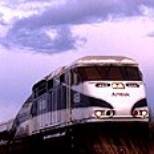
 Train travel are an alternative to flying for professionals in the Pacific Northwest, using the Amtrak Cascade route between Eugene, OR and Vancouver B.C. Because the delays associated with airport security don’t happen with trains, the total trip time is not much less traveling by air, and the train provides a much better working environment for business travel. Amtrak trains offers a convenient alternative to flying and long-haul driving even to people like me who live in the country.
For eight months, I commuted two days a week to a client’s site 122 miles away from my office. I live in Blodgett, Oregon, a small town in Oregon’s Coast Range, not far from Corvallis and Oregon State University. My client was a semiconductor firm just over the border in Camas, Washington.
For me, this was something of a luxury. Most of my clients are in Silicon Valley and are so overworked that they actually don’t want to see me more than absolutely necessary. They meet with me, on average, once or twice per project, and we keep in touch mostly by email. This gives them the maximum amount of control over their time. I am an electrical engineer by training (one of only a handful in the writing business), and I don’t need much support to get the job done.
But this client was only 122 miles away and actually wanted to see me a couple of days a week. This frequent contact tends to result in a faster and better document, but with a much larger investment of the client’s time.
I drove the 244-mile round-trip two days a week in June and July. It was very wearing, especially on the return trip. I started giving thought to riding the train.
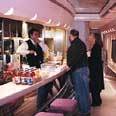 The Amtrak Cascades are high-class commuter trains, with good seats, AC power in every row, and a Bistro car with an excellent menu, as these things go. The fares cost less than the standard mileage rate.
The basic problem with the Amtrak commute was this: I could drive to the station closest to my home (Albany) and get on the train. No problem. There was plenty of free parking. But what about the other end? The closest station to Camas was at Vancouver, Washington, which was a twenty-minute drive to my client’s site.
I was mulling this over when it dawned on me that Vancouver, too, had free parking. Why not keep an old car in the station parking lot and use it to shuttle between the station and my client? I even had an old car I wasn’t using for anything; my trusty VW Rabbit, which I’ve had since the Carter administration. I asked at the Vancouver station, and the station staff had no objection. There was plenty of free parking, and there had been no trouble with vandalism. With a Burlington Northern and Santa Fe depot right next to the Amtrak station, I figured that railroad people would be coming and going at all hours, and even vandals are probably smart enough to avoid confrontations with railroad workers.
So I was looking at a drive from my farm in the Coast range to the Albany station, a train ride to Vancouver, and another drive from Vancouver to Camas. Was it practical? Was it an advantage? Here is how a commute looked before and after the switch to the train:
Before
|
5:30 AM
|
Get in the car and hit the road
|
|
8:00 AM
|
Arrive at the client’s site
|
|
5:00 PM
|
Leave the client’s site (bill 8.5 hours of work)
|
|
8:00 PM
|
Arrive at home.
|
After
|
5:30 AM
|
Get in the car and hit the road
|
|
6:28 AM
|
Board the train at the Albany station
|
|
9:07 AM
|
Get off the train at the Vancouver station (bill 2.5 hours of work)
|
|
9:08 AM
|
Get in my second car
|
|
9:30 AM
|
Arrive at the client’s site
|
|
4:00 PM
|
Leave the client’s site (bill 6 hours of work)
|
|
7:15 PM
|
Get off the train at the Albany station (bill up to 2.5 hour of work)
|
|
8:00 PM
|
Arrive at home
|
As you can see, the total time away from home was the same (a very long day) in both cases. The important differences were twofold:
- If I felt tired, I could relax, close my eyes, or even sleep on the train, which I couldn’t do when driving. When driving, I always arrived home exhausted. When taking the train, I was in much better
- If I didn’t feel tired, I could work up to five hours on the train, stretching my working day to 11 hours. When driving, the maximum was eight hours.
On an average day, I worked straight through in the morning, but didn’t work on the return trip at all, but took it easy. But the extra time was there when I needed it. Even an hour spent working on the trip home helped put me on top of my workload.
Work Environment

What kind of work environment does the train provide? I was surprised at how easy it was to get work done on the train. There aren’t a whole lot of distractions. The movement of the train makes your handwriting shaky, but it doesn’t interfere much with using a laptop computer. I have drawn intricate diagrams using my laptop while traveling over bumpy stretches of track. It slows you down some, but not much.
The seats and tray tables are much larger than on airliners, and there’s more leg room. The crew encourages you to work in the dining car if it isn’t crammed wall to wall with diners. And you can always get up, stretch your legs, or have a snack on the train. All in all, I find an hour on the train is much more productive than an hour on an airplane, and you don’t have to go through security or arrive early the way you do when flying.
Cell phone reception is pretty good, too, but I rarely used the phone while on the train. As a writer, one of my biggest obstacles to success lies in coming up with large blocks of ininterrupted work time, and I used my time on the train to get things sorted out and written down. Other riders often made one phone call after another on the train.
Fellow passengers were usually quite friendly and were understanding if I wanted to keep my head down and plow through work instead of talking to them. The trains are rarely full south of Portland, though they are frequently full between Portland and Seattle. The upshot was that I could always use the seat next to me, and its tray, between Albany and Portland.
Schedule
The trains sometimes run late. My experience was that the morning run was almost always on time, and often arrived a few minutes early in Vancouver. The evening return trip almost always arrived in Albany between 15 and 45 minutes late. The people who were most upset by the erratic arrival times of the evening trip were those who were being met at the station. They would have to get on their cell phones and give updates to the long-suffering friends and relations who were going to pick them up. Since I was driving my own car, this was not a problem for me.
The train is much more likely to be on time in Washington than Oregon. In Washington, the tracks are owned by BNSF (Burlington Northern & Santa Fe), which has a good relationship with Amtrak. Their dispatchers whisk the train along as briskly as they can. In Oregon, the tracks are owned by the Southern Pacific, which is apparently engaged in a permanent feud with Amtrak. The train will spend random amounts of time on sidings to allow slow freights to lumber by.
Movies
There are several TVs mounted near the ceiling in each car, and each seat has a headphone jack so you can listen to it. If you take a full round-trip between Eugene and Seattle, you will see four movies: one between Eugene and Portland, one between Portland and Seattle, and two more on the return trip. What kind of movie is shown seems to vary randomly over time. It could be anything from the latest Tom Clancy thriller to black-and-white classics. Sometimes they change the movies weekly, sometimes monthly. Once they showed the Marx Brothers in “Duck Soup” on every trip for six weeks!
If you forget your headphones, you can buy a set in the Bistro car.
Costs
Tickets bought with a AAA discount varied from between about $25 and $40 (between Albany and Vancouver), depending on how many people got in ahead of me and bought up the cheaper seats. Various promotions are used, off and on, during the slower parts of the year. The best deals seem to be available over the Internet (http://www.amtrak.com/), as Amtrak is trying to shift people to this convenient booking mechanism.
Limits
I felt that the Albany-Vancouver run was about my limit for twice-a-week commuting, but I met one guy on the train who commuted between Eugene and Portland five days a week. He would step onto his morning train at 5:30 AM and step off his evening train at about 8:30 PM. That’s an awfully long day, but he seemed happy with it.
From the Albany station, I can reach Seattle after lunch and be on my way home in the early evening, spending roughly half a day at the client’s site. This gives me roughly the same schedule I have when I fly in for a whirlwind client visit to Silicon Valley.
Update, September 2005
Tips
- Try the clam chowder.
- The tables in the dining car don’t have AC outlets, so it’s hard to use a laptop there for long periods.
- The back rows in some of the cars have only one seat. Taking this seat can guarantee you don’t have a neighbor. The row in front of you has two seats, so you get a second tray table you don’t have to share.
- The tables on the seats are big enough for a laptop, but not a laptop and a mouse.
- The train sometimes has its water system shut off while sitting in major stations (Portland, Eugene, Seattle), so if you’re in the bathroom and put sixteen pumps of liquid soap on your hands and discover there isn’t any water, don’t say you weren’t warned.
- If kids going constantly back and forth and families yakking at each other drive you crazy, upgrade to business class for the extra calm. It’s only a few dollars more.
- Be nice to the crew. They give back what they get. If you’re pleasant, they’re pleasant. The conductors are quick to remove belligerent passengers from the train at the next station.
For More Information
See the Amtrak Cascades Web Page at http://www.amtrakcascades.com
 Having trouble getting documentation written? This guide is written for managers who are not technical writers, but who have been assigned the task of ensuring that documentation happens.